LüftBot: Automating the fan inside of my bedroom lamp
My smart home is one dumb fan and I freely admit it.
My bedroom lamp
My bedroom ceiling lamp is kind of fancy: it has an inbuilt fan. I find it to be super useful to get the air flowing when I stoßlüfte, i.e. open all my windows and doors for some fresh air1.
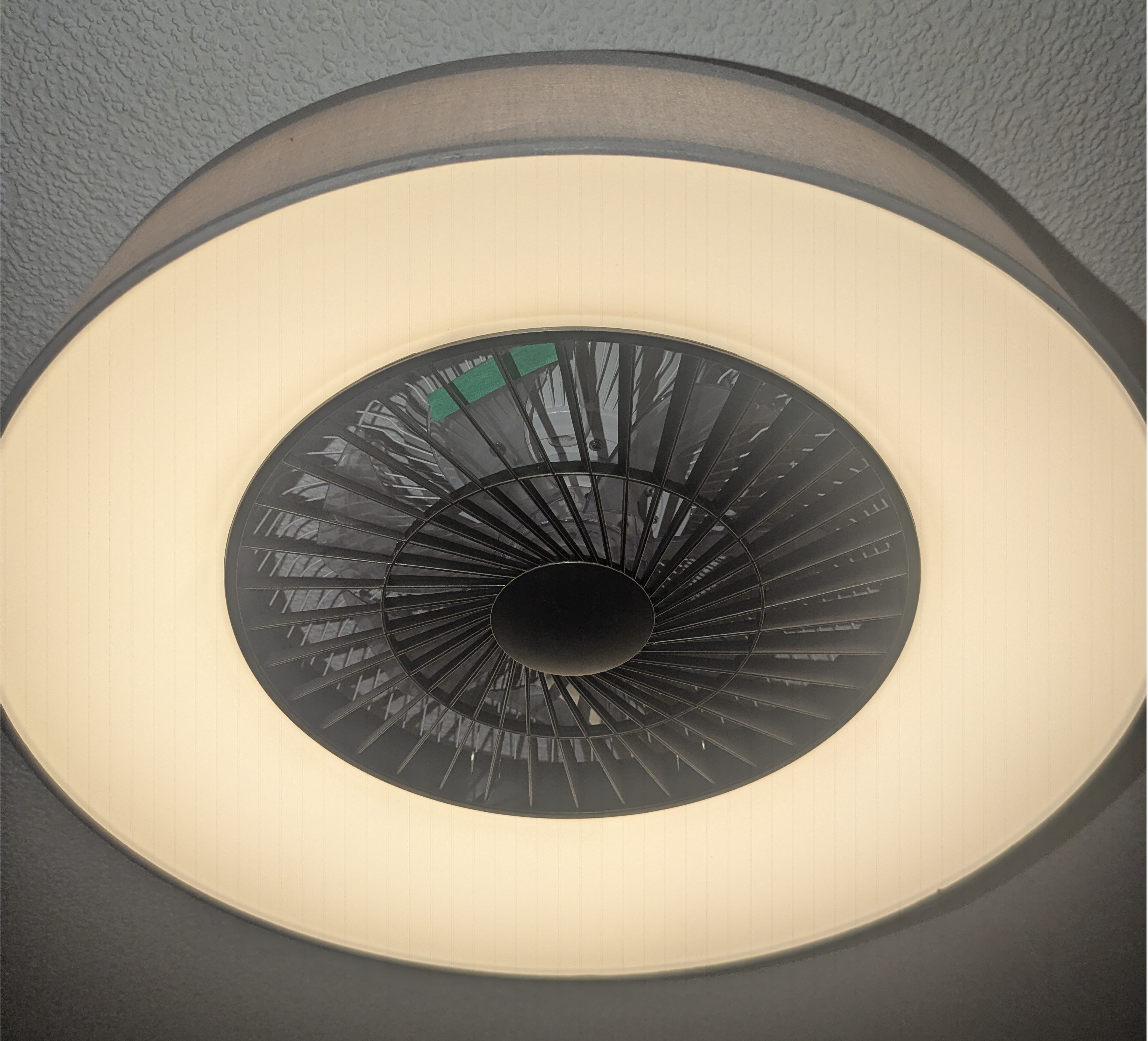
The thing is, it can only be controlled by a remote. But do you know what would be really cool? If it could run for a few minutes every full hour of the night and exchange some stale air while I sleep.
Here we go again..
The smartest thing that will ever be in my apartment
I don’t want to get into smart home stuff. I never really felt a real need for it, and an Alexa in my home would make me sleep much worse than the fresh air could counteract.
Still, for the sake of completeness, I want to mention that there are some ready-made products that you could buy which would purportedly help you with this, e.g. the Broadlink RM4 Mini.
But me being me, I welcomed the chance to tinker on something new. So I decided to build my own version with blackjack and hookers an IR transmitter and a Raspberry Pi Zero WH.
The idea
The idea is plain and simple:
- Connect an IR transmitter and an IR receiver to a Raspberry (Zero WH, in my case)
- Record and store the IR signals that my remote control sends when I press its buttons
- Use a schedule to send out the right IR signals at the right times
- Build a simple web UI which allows me to edit the schedule easily
Here is what it looks like after wiring up the receiver and the transmitter to the board at the correct pins:
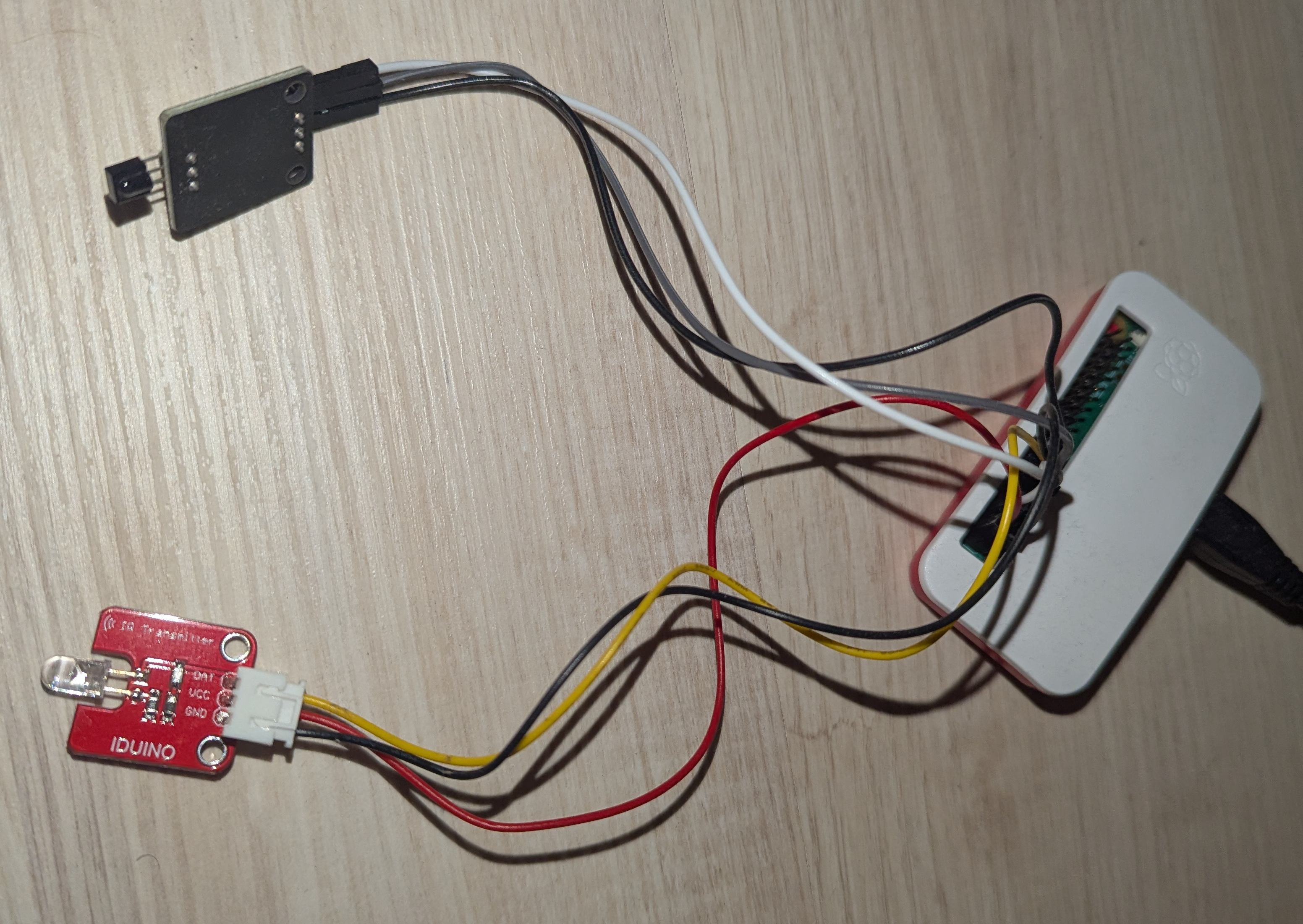
Setting up the IR transmitter and receiver
In a first step, I had to connect the transmitter and receiver to my Pi:
- Edit
/boot/firmware/config.txtto make the kernel load the IR drivers for the relevant pins:dtoverlay=gpio-ir,gpio_pin=23 dtoverlay=gpio-ir-tx,gpio_pin=18 - The kernel randomly assigns them to either
/dev/lirc0and/dev/lirc1on boot. To fix, create stable symbolic links by editing e.g./etc/udev/rules.d/99-ir-gpio.rules:KERNEL=="lirc[0-9]*", SUBSYSTEM=="lirc", SUBSYSTEMS=="platform", DRIVERS=="gpio_ir_recv", SYMLINK+="ir-receiver", GROUP="video", MODE="0660" KERNEL=="lirc[0-9]*", SUBSYSTEM=="lirc", SUBSYSTEMS=="platform", DRIVERS=="gpio-ir-tx", SYMLINK+="ir-transmitter", GROUP="video", MODE="0660"and add your user to the
videogroup:sudo usermod -a -G video $USER - Reboot!
Now, the receiver is always at /dev/ir-receiver and the transmitter at /dev/ir-transmitter. Nice!
Recording and repeating IR signals
IR remotes work by flashing a LED at a specific carrier frequency (usually 38kHz) to distinguish their signal from the background light (like sunlight or lightbulbs). Data is encoded as specific patterns of pulses (when it flashes) and spaces (LED is off completely).
I installed v4l-utils to handle the raw data. It provides the handy ir-ctl utility, allowing me to treat these signals as simple textfiles containing the timing data, and repeat them from this same file format, sparing me from writing any code that touches the GPIO pins directly.
- Recording:
Runir-ctl -r -d /dev/ir-receiver > fan_on.irand press the button on your remote exactly once. The-rmeans to receive raw data (and not to try to decode any smarter protocols like NEC), and-dspecifies the device to use. This saves the raw pulse/space timings (in microseconds) to a file. It starts off with this:space 1677721 pulse 9024 space 4512 pulse 564 ...Where you can just remove the first line as that space is just the time it took me to hit the button on the remote.
- Send: To replay the command, just feed that file back to the transmitter:
ir-ctl -d /dev/ir-transmitter --send=fan_on.irIf you struggle with your device not reacting, try to set the carrier frequency explicitly (just add
-c 38000to the command above) and play with the value, as some devices use other frequencies.
Let’s try it!
I set up my contraption in the corner of my room, SSHed into my Pi, sent off some example IR signals and voilà - it didn’t work. I had to bring the IR sender to about 30cm from the lamp for it to actually receive the signal. And that was with lights off - if the lamp was turned on, it didn’t work at all.

The solution was to simply replace the black colored IR transmitter by a red one I bought ;-) This new one, while looking almost identical, proved to be sending out much stronger signals and it now worked across the room, even with lights on. I do still have to point it directly at the lamp, though.
The webapp
Nothing fancy, vibe-coded in an hour or so, uses Flask and Waitress for the WSGI. Very simply, it allows you to:
- Record new signals and persist them to disk in a simple JSON format
- Send out loaded signals with the click of a button (for testing)
- Define a schedule: e.g. “Send signal
set_fan_level_2, then wait 5 minutes, then send signalstop_fan”. - Allows to configure the schedule to run only at night, e.g. between
23:30and08:30
When sending IR signals, it sends it 3 times with a few seconds pause in-between. I figured this improves the chances of the lamp actually receiving the signal.
The UI is so simple (read: ugly), a screenshot would not be worth your bandwidth.
That’s all!
Sleep tight and keep your CO₂ low! If you need me, I’ll be overengineering the next inconvenience.
-
I only recently learned that this is not a thing people do everywhere, after it became a trend in the US which they apparently call “house burping”. ↩